---
title: Unable to read the QR Code
description: This article explains causes and fixes when a QR code won’t scan, including scope mode settings, QR code size, distance, distortion, dirt, reflections, and other tips to improve readability.
---
[Skip to content](https://support.qrqrq.com/en-us/unable-to-read-the-qr-code#main-content)
- [English - United States](https://support.qrqrq.com/en-us/unable-to-read-the-qr-code)
- [日本語](https://support.qrqrq.com/ja/unable-to-read-the-qr-code)
English - United States
Show submenu for translations

Open main navigation
Close main navigation
- - [English - United States](https://support.qrqrq.com/en-us/unable-to-read-the-qr-code)
- [日本語](https://support.qrqrq.com/ja/unable-to-read-the-qr-code)
English - United States
Show submenu for translations
- Contact us
Contact us
How can we help you?
- There are no suggestions because the search field is empty.
1. [QRQR](https://support.qrqrq.com/en-us?hsLang=en-us)
2. [QRQR - QR Code Reader](https://support.qrqrq.com/en-us/qrqr-qr-code-reader?hsLang=en-us)
3. [Troubleshooting](https://support.qrqrq.com/en-us/qrqr-qr-code-reader?hsLang=en-us#troubleshooting)
# Unable to read the QR Code
If you're unable to scan a QR code, there could be several reasons.
Please try the following methods first.
1. [Check the Scope Mode settings](https://support.qrqrq.com/hc/en-us/articles/8192736910361-Unable-to-read-the-QR-Code?qrqrManagerUserId=noId&service=qrqr_manager&hsLang=en-us#h_01G7BG58B8J58W0BAS6J01BAME)
2. [There is a problem with the QR code](https://support.qrqrq.com/hc/en-us/articles/8192736910361-Unable-to-read-the-QR-Code?qrqrManagerUserId=noId&service=qrqr_manager&hsLang=en-us#h_01G7BG5GRWAHMY20QM8JTS3V47)
3. [The QR code is inverted](https://support.qrqrq.com/hc/en-us/articles/8192736910361-Unable-to-read-the-QR-Code?qrqrManagerUserId=noId&service=qrqr_manager&hsLang=en-us#h_01G7BG5PNJM2F64GT6DFAQJYCT)
#### 1. Check the Scope Mode settings
"Scope Mode" refers to a function that focuses on scanning QR codes that overlap with the effect area in the center of the camera screen.
- QR codes suitable for Scope Mode
- There are multiple QR codes within the screen
- QR codes not suitable for Scope Mode
- The QR code does not appear in the center of the camera screen
Please change the Scope Mode settings according to the QR code you want to scan.
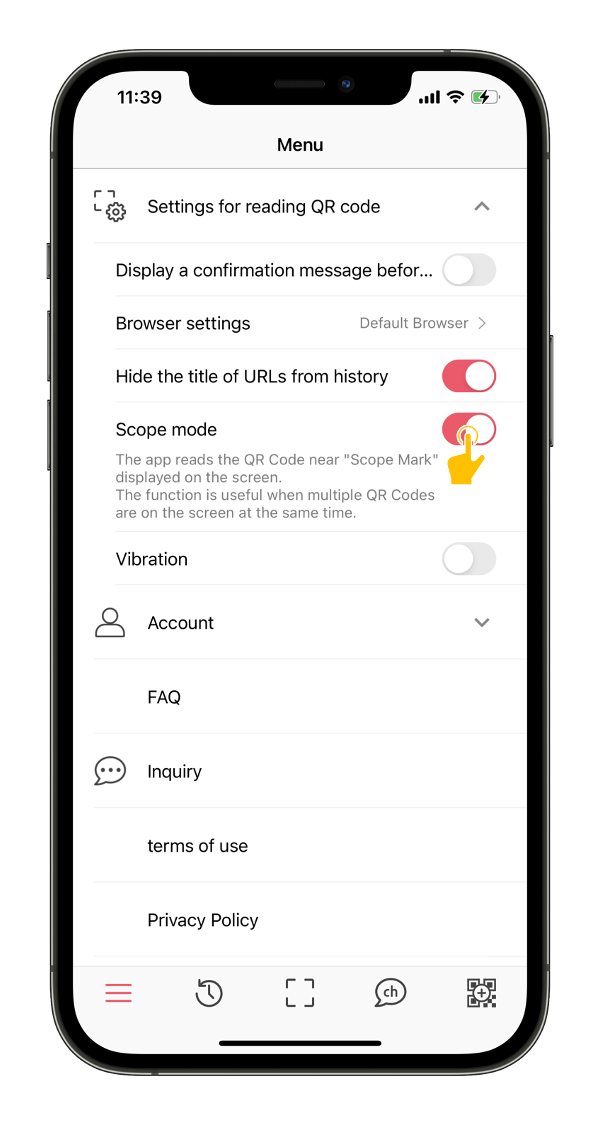
For more information about Scope Mode, please see [here](https://support.qrqrq.com/hc/en-us/articles/900006153806?qrqrManagerUserId=noId&service=qrqr_manager&hsLang=en-us).
#### 2. There is a problem with the QR code
A QR code may be difficult or impossible to scan if it meets any of the following conditions:
- Extremely small
- Too far or too close to the camera
- The printing surface is distorted (not flat)
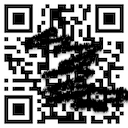
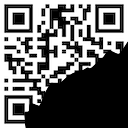
- Partially dirty or damaged
- Reflecting light
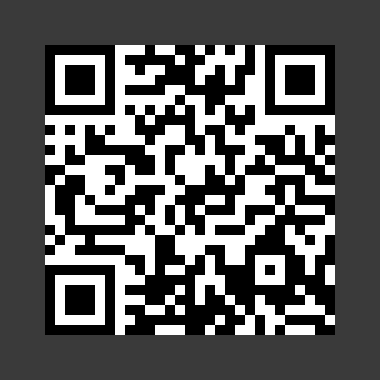
- No margin around the QR code
| 汚れた QRコード | 欠損した QRコード | 小さすぎる QRコード | 余白がない QRコード |
| --- | --- | --- | --- |
|  |  |  |  |
In such cases, please try the following:
- Move the camera back and forth to adjust the focus
- Smooth out any wrinkles to make the surface flat
- Wipe off any dirt
- Create a shadow to avoid reflection
If the issue persists after trying the above, please contact us.
- [QRQR - QR Code Reader](https://support.qrqrq.com/en-us/qrqr-qr-code-reader?hsLang=en-us#main-content)
- [How to use](https://support.qrqrq.com/en-us/qrqr-qr-code-reader?hsLang=en-us#how-to-use)
- [Troubleshooting](https://support.qrqrq.com/en-us/qrqr-qr-code-reader?hsLang=en-us#troubleshooting)
[](http://www.arara.com)
[mailto:email@email.com](mailto:email@email.com)
Copyright 2022 arara inc.